The blocks of a computer and its voltage rails
14 minutes · Intermediate
Simulations and quizzes aren't read aloud; pause when you reach them and try them out.
To repair a computer you need to know what each part does and what voltage it runs on. Most computer faults aren't in the software but in a link of this power chain. In this course we'll look at desktop and laptop computers through an electronics technician's eyes.
📷 What's on a desktop motherboard?
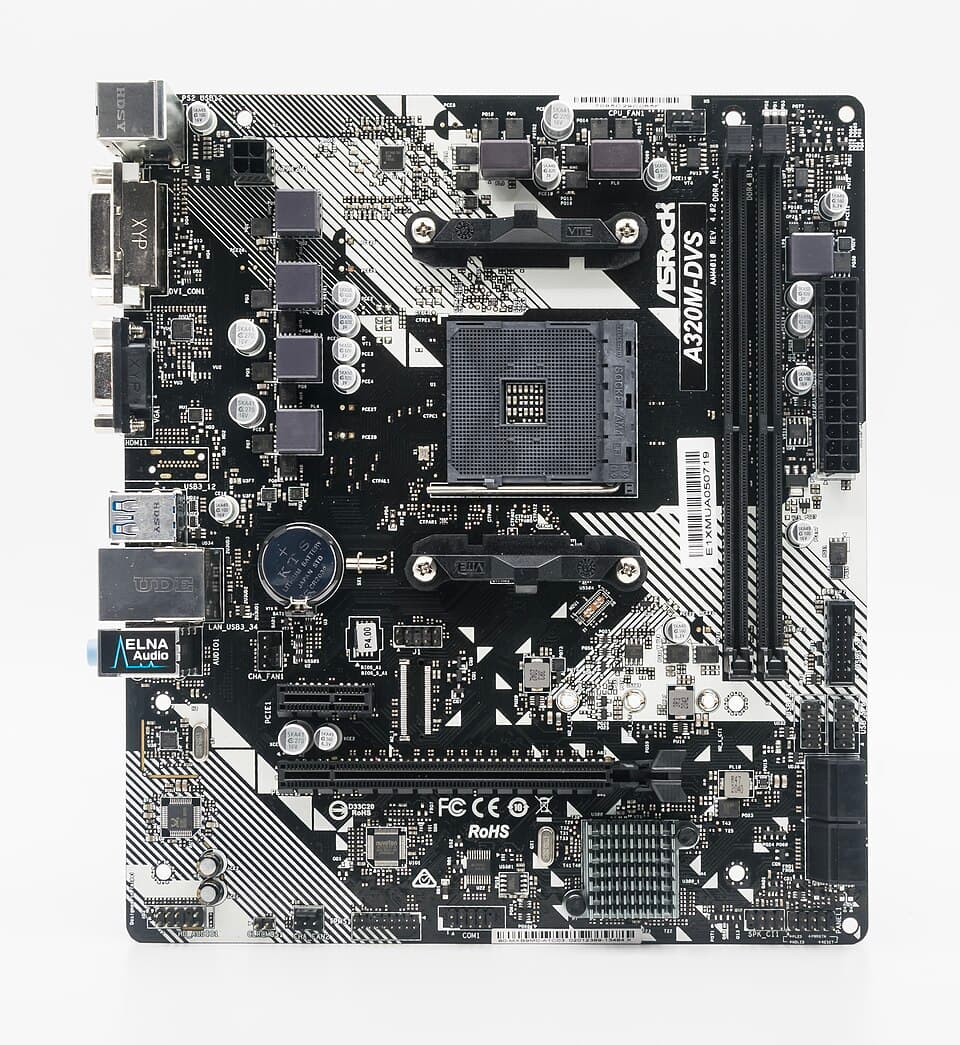 123456789101112
- 1CPU socket
- 2VRM: CPU power inductors and MOSFETs
- 3The VRM's other phases
- 4CPU 12 V power input (4/8-pin EPS)
- 524-pin ATX power input
- 6RAM slots (DDR4)
- 7CMOS battery (CR2032)
- 8BIOS chip (labeled SPI flash)
- 9PCIe x16: graphics card slot
- 10Chipset, with heatsink
- 11Rear panel connections (USB, HDMI, audio, network)
- 12SATA drive connectors
The main blocks
- Power supply (PSU): converts the mains into 12 V, 5 V, 3.3 V and 5 V standby voltages.
- Motherboard: connects all the parts together. It carries many converters producing the low voltages the CPU, memory and chipset need.
- Processor (CPU): runs at around 1 V but with currents that can exceed 100 A. The motherboard's VRM supplies this power.
- Memory (RAM): the data of running programs. DDR4 runs at 1.2 V, DDR5 at 1.1 V.
- Storage (SSD, HDD): permanent data. M.2 NVMe SSDs are powered from 3.3 V.
- Graphics card (GPU): a small computer with its own VRM and memory; powered from 12 V.
- BIOS / UEFI: the first software, stored in a small flash memory on the motherboard. It tests the hardware (POST) and starts the operating system.
The voltage chain
| Voltage | From where? | Who uses it? |
|---|---|---|
| +12 V | Power supply | VRM (CPU), graphics card, fans |
| +5 V / +3.3 V | Power supply | USB, SATA, M.2, chipset |
| +5 VSB | Power supply (always on) | The circuit that listens for the power button, wake-up, USB charging |
| ~0.7–1.4 V (Vcore) | Motherboard VRM | CPU cores |
| 1.1–1.35 V | Motherboard DC-DC | RAM |
| 3 V | CMOS battery | Clock and BIOS settings (while the computer is off) |
Are laptops different?
The same logic, but there's no power supply: the energy from the adapter (19–20 V) or USB-C goes into the charging circuit on the motherboard. The motherboard produces all the voltages itself. That's why laptop repair is mostly motherboard repair; we'll cover it separately in the last lessons.Test yourself
1. Roughly what is the CPU core voltage (Vcore)?
2. Which circuit produces Vcore?
3. Which voltage is present even when the computer is off?
4. Where is the BIOS stored?
This was the free first lesson of the course
The remaining 8 lessons of Computer Hardware and Board Faults, with their simulations and quizzes, unlock when you buy the course.
See the full course →